Getting Started with Claude and MCP
I've been using Claude Code for my development and have been exploring its extensibility options: MCP (Model Context Protocol) servers, Skills, and Plugins. This article demonstrates just how quick it is to customize Claude to use a MCP Server.
Why Miro?
Miro is my go-to diagramming tool, especially for collaborative work. When I discovered they offer an MCP server, I had to try it. If you haven't used Miro, grab a free account—it's worth exploring.
Setup in Under 5 Minutes
Adding an MCP Server to Claude takes just a few steps:
-
In your project directory, run:
claude mcp add --transport http miro https://mcp.miro.com -
Start Claude and authenticate:
/mcp auth -
Select the Miro MCP server and complete the OAuth flow.
That's it. You're ready to go.
Putting It to Work
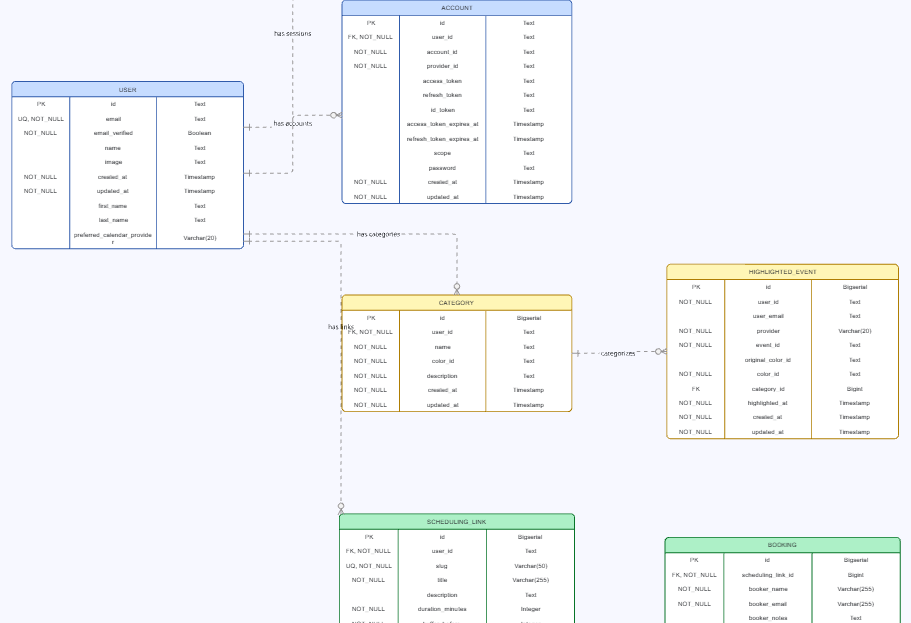
I had a SQL schema file for a database I was working with, so I prompted Claude:
"The full database schema is in @../schema.sql. Use the Miro MCP server to build a diagram depicting the database schema."
Claude handled everything from there. The only manual step: Miro's MCP can't create new boards yet, so I had to create a blank board in Miro and provide the URL when Claude asked.
The Result
Here's what Claude generated. A solid starting point for understanding and documenting a database structure:
Next up: architecture diagrams. I'm curious to see how well it handles more complex system relationships.
MCP Servers
Of course, Miro isn't the only MCP server, there are 100's of them. Here is a smaple I have found useful:
GitHub
- claude mcp add --transport http github https://api.githubcopilot.com/mcp/
Slack
- claude mcp add slack --transport http https://mcp.slack.com/mcp
Playwright
- claude mcp add playwright -- npx -y @playwright/mcp@latest
Figma
- claude mcp add --transport http figma https://mcp.figma.com/mcp
Vercel
- claude mcp add --transport http vercel https://mcp.vercel.com
Postgres
- claude mcp add postgres-server --type stdio ...